Retail Media Reporting Dashboard: What Brands Actually Need to See
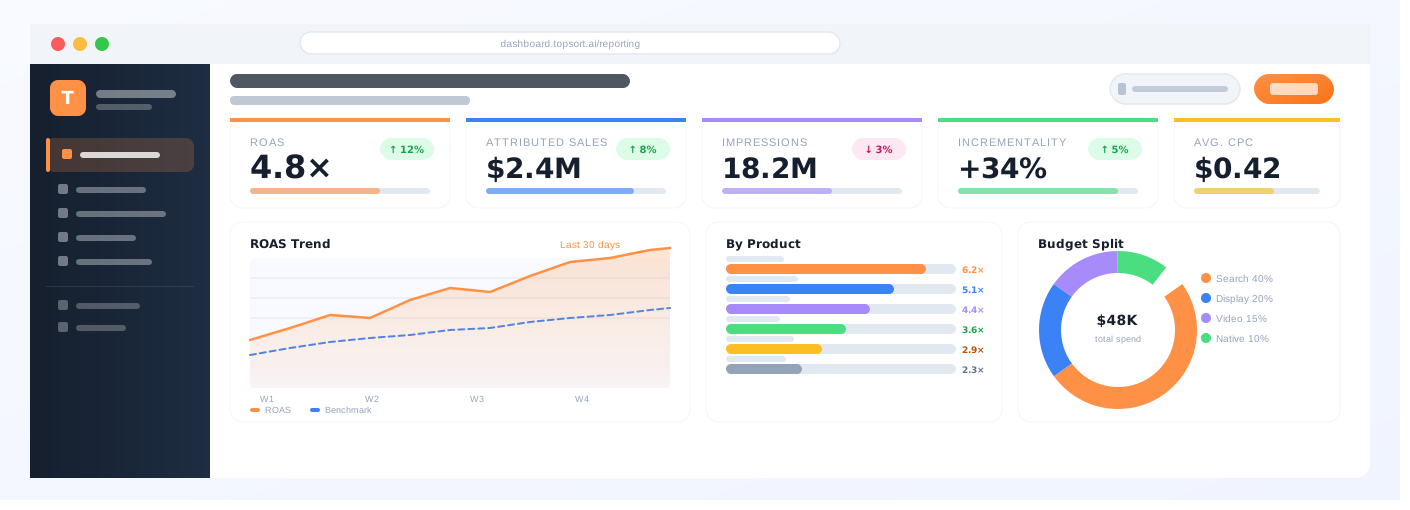
Retail media reporting is one of the most important parts of the advertiser experience. Brands and sellers do not only want to buy media. They want to understand what happened, what worked, and what to do next.
At Topsort, we believe retail media reporting should help advertisers make decisions, not just review numbers. A strong dashboard should show what happened, why it happened, and what the brand or seller should do next.
A strong retail media reporting dashboard helps answer those questions. It connects campaign activity to commerce outcomes and gives advertisers confidence that their investment is creating value.
But many retail media reports stop too early. They show impressions, clicks, and spend, but do not clearly explain sales, ROAS, incrementality, product-level performance, or placement impact.
In 2026, brands need more than activity reporting. They need business proof.
What is a retail media reporting dashboard?
A retail media reporting dashboard is a tool that shows advertisers how their retail media campaigns are performing.
It can include metrics such as:
- Spend
- Impressions
- Clicks
- Click-through rate
- Attributed sales
- Revenue
- ROAS
- Conversion rate
- Product-level performance
- Placement-level performance
- Incremental revenue
- New-to-brand customers
- Basket impact
The goal is to help brands understand campaign performance and make better decisions.
Why retail media reporting matters
Retail media depends on advertiser trust.
If brands cannot understand performance, they may reduce spend or move budgets elsewhere. If reporting is clear and actionable, brands are more likely to renew, increase investment, and test new placements.
Good reporting helps brands answer:
- Did the campaign drive sales?
- Which products performed best?
- Which placements created value?
- Which audiences responded?
- Was ROAS strong enough?
- Was revenue incremental?
- What should we change next time?
Reporting should not only describe the past. It should guide the next investment decision.
Core metrics every dashboard should include
Every retail media dashboard should include a core set of campaign metrics.
Spend
Shows how much budget has been used.
Impressions
Shows how often ads were shown.
Clicks
Shows how often shoppers engaged with ads.
Click-through rate
Shows the percentage of impressions that became clicks.
Conversion rate
Shows how often shoppers converted after ad engagement.
Attributed sales
Shows which sales were connected to ad interactions.
Attributed revenue
Shows the revenue credited to the campaign.
ROAS
Shows attributed revenue divided by ad spend.
These metrics create the baseline for campaign reporting.
Metrics that build advertiser trust
To build deeper trust, retail media dashboards should go beyond basic reporting. These metrics become stronger when reporting combines closed-loop attribution, incrementality, and transparent attribution models.
Incremental revenue
Shows the revenue caused by advertising, not just connected to ads.
Incremental ROAS
Shows return based on incremental revenue.
Conversion lift
Shows whether exposed shoppers converted at a higher rate than a comparable control group.
New-to-brand customers
Shows whether the campaign brought in new buyers.
Basket impact
Shows whether the campaign influenced total order value or related purchases.
Category lift
Shows whether the campaign helped grow a category or improve share.
These metrics help brands understand business impact, not only campaign activity.
Product-level reporting
Retail media is closely tied to products. Brands and sellers need to know which products are performing.
Product-level reporting should include:
- Product impressions
- Product clicks
- Product purchases
- SKU-level attributed sales
- Product-level ROAS
- Product conversion rate
- Product-level spend
- Out-of-stock context
- Price or promotion context
This is especially important for sponsored products and sponsored listings.
If brands cannot see product-level results, they cannot optimize product-level budgets.
Placement-level reporting
Not all placements perform the same way.
A retail media dashboard should show performance by placement, such as:
- Search results
- Category pages
- Product detail pages
- Homepage
- Cart or checkout
- App placements
- Offsite media
- In-store media
Placement-level reporting helps advertisers understand which surfaces deserve more budget.
It also helps retail media networks price inventory, improve ad products, and protect shopper experience.
Attribution transparency
A dashboard should not only show results. It should explain how results were calculated.
Brands should understand:
- Attribution windows
- Click-through attribution rules
- View-through attribution rules
- SKU-level attribution
- Basket-level attribution
- Halo attribution
- Duplicate credit rules
- Whether results are attributed or incremental
Transparent methodology builds trust.
If advertisers do not understand how numbers are calculated, they may question the results.
Actionable insights
The best retail media dashboards do not just show data. They help advertisers act.
A good dashboard should help answer:
- Which campaigns should scale?
- Which products need more budget?
- Which placements are underperforming?
- Which bids or budgets should change?
- Which sellers or brands are growing?
- Which campaigns should be tested next?
AI and automation can help surface these insights, but the foundation must be clean campaign, product, event, attribution, and reporting data.
What retail media operators need to see
Retail media operators need a different view from advertisers.
Operators may need to monitor:
- Total media revenue
- Fill rate
- Campaign pacing
- Placement utilization
- Advertiser spend
- Seller adoption
- Inventory performance
- Ad load
- Relevance
- Reporting quality
- Revenue by format
A strong reporting system should support both advertiser-facing and operator-facing needs.
How Topsort helps
Topsort helps retailers, marketplaces, delivery apps, travel platforms, and commerce businesses build retail media programs with API-first ad serving, auctions, attribution, reporting, and AI optimization.
Because Topsort connects ad delivery to commerce events, it helps media teams report on the outcomes brands care about: impressions, clicks, attributed sales, ROAS, product-level performance, placement-level performance, and optimization signals.
For commerce platforms, reporting is not just a dashboard. It is how advertisers decide whether to increase investment.
Final takeaway
A retail media reporting dashboard should do more than display impressions and clicks.
Brands need reporting that connects media activity to commerce outcomes. They need attributed sales, ROAS, incrementality, product-level reporting, placement-level insights, and transparent methodology.
The best dashboards help brands trust the results and decide what to do next.
Retail media networks that provide clearer reporting will be better positioned to win budgets, retain advertisers, and scale long-term revenue.
FAQ
What is a retail media reporting dashboard?
A retail media reporting dashboard shows advertisers how campaigns are performing, including spend, impressions, clicks, attributed sales, ROAS, product-level performance, and other metrics.
What metrics should a retail media dashboard include?
It should include spend, impressions, clicks, CTR, attributed sales, revenue, ROAS, conversion rate, product-level performance, placement-level performance, and incrementality where available.
Why is retail media reporting important?
Reporting helps brands understand campaign performance, prove ROI, and decide whether to increase or change investment.
What is product-level reporting in retail media?
Product-level reporting shows campaign performance by product or SKU, including impressions, clicks, purchases, revenue, and ROAS.
Why should dashboards include incrementality?
Incrementality helps brands understand which sales were caused by advertising, not just which sales were attributed to ads.
Want to give advertisers reporting they can trust? See how Topsort helps commerce platforms connect ad serving, attribution, reporting, and optimization through API-first retail media infrastructure.
.png)
.png)